Google is a PAID search engine with some free results
“Google is a PAID search engine with some free results, act accordingly” – I said this for the first time maybe 10 years ago at a small SEO workshop. It was a bit dramatic at the time but I think at this point in 2025 we can safely say this is true.
If you’re like most of the customers we work with you’ve probably seen a dramatic drop in SEO and organic traffic over the last year as Google has optimized the search results for ads, for AI snippets and essentially anything but the regular organic results.
We’ve seen our own click through rate (CTR) in organic search go from ~10-15% for terms where we’re in position 1-3 to 2-3% CTR without a change in rankings. That’s an 80% drop in traffic!
***
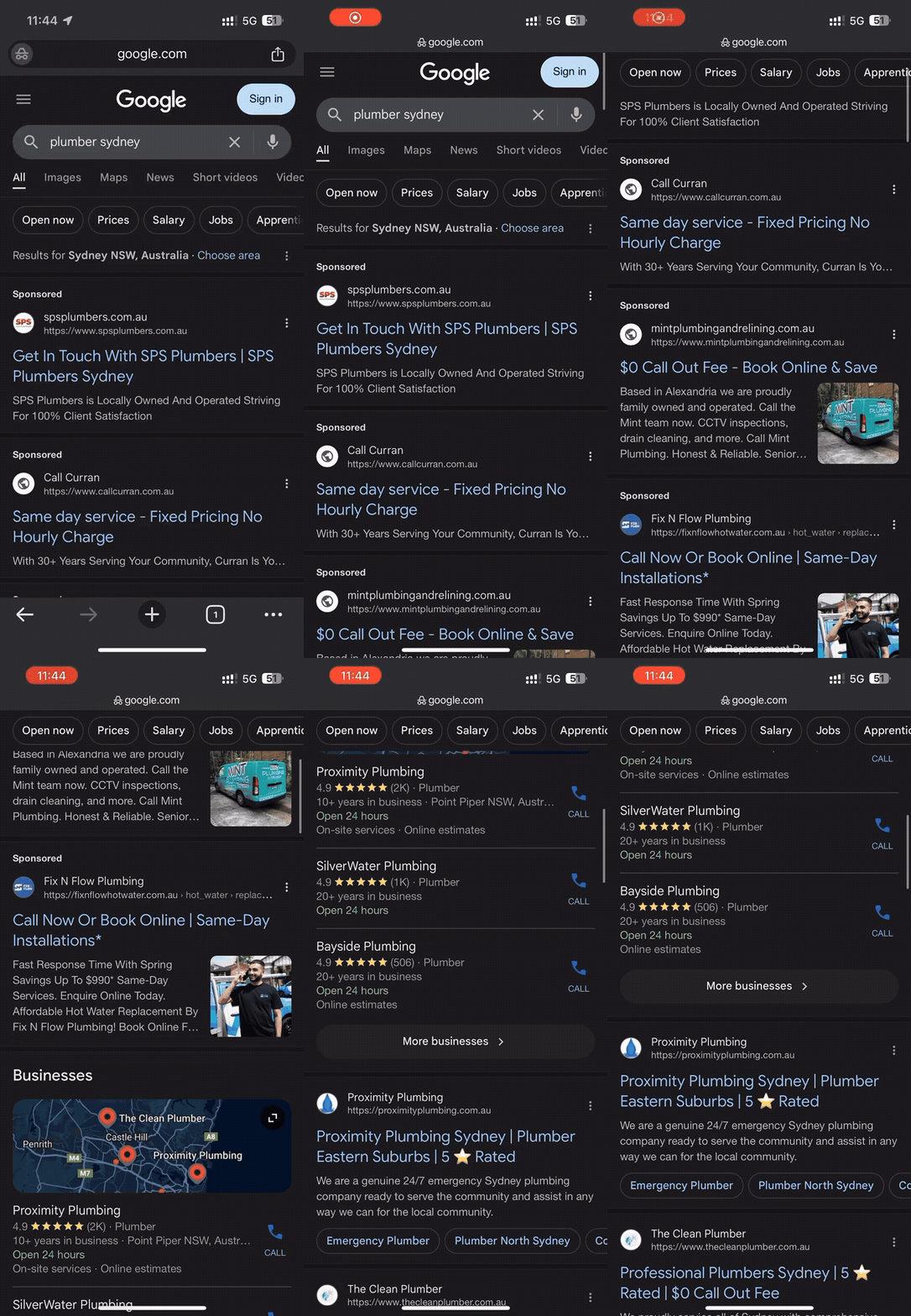
Even without all the AI results and other noise Google has injected in the search results, for most searches done on mobile, it’s a good 2-3 scrolls at a minimum before you start getting to the regular organic search results.
Try it yourself – do a search for say a plumber or dentist in your city and you’ll see there’s 4 ads at the top, maybe a paid Google Maps listing, the regular Google Maps listings and then regular search results.
In 2025, if search is an important marketing channel for you, you need to pay up. For our own search strategy, we’re slowly moving across to a fully paid strategy, including bidding for terms relating to our content marketing and blog articles.
If you’re not running ads, here’s some simple ways to get started:
Brand ads or ads on your brand name aka the Google tax – if you’re like most businesses, competitor ads are probably triggering for searches with your brand name or even partial matches for your brand name. The reason why people do this is because it works AND these searches are usually cheap!
We know this works because it’s a tactic we deploy for customers we’re managing Google Ads for. This works particularly well for local businesses where customers are not particularly brand aware or maybe not have strong brand loyalty.
It may seem unfair to pay for ads for your own brand BUT this usually the highest quality traffic your site can get and if you’re not defending these searches using Google Ads, your competitors are probably taking advantage of it.
****
Advertising on competitor brands – yes its grey area but as above, in most cases it works. Assuming you have good conversion tracking setup, try it with a limited budget for say 90 days and see how it performs.
Be mindful not to use competitor trademarks or brand names in ad copy – that’s crossing the line legally and will likely get your ads or ad account suspended and potentially open you up to legal liability.
Google Shopping – I’m still surprised today that we regularly see ecommerce sites that are not using Google Shopping. If you’re selling products you need to use Google Shopping.
Ads to content and blog articles – if your SEO content marketing strategy is working or was working, then it follows that paying for traffic to content and blog articles will probably work too. This is something we’ve been experimenting with over the last few months and it works for us.
In our case, we used our highest performing content, pulled the highest performing keywords from Google Search Console and started running ads with a limited budget. We used the initial data to build negative keyword lists to prune down the search terms the ads showed for which has reduced the spend and increased the campaign effectiveness.
Yes this is a lot of work BUT because almost nobody is doing it, clicks are cheap!
Google Ads tools we use
If you’re going to give this a go, here’s some tools we use and recommend that will make this easier:
Clickcease.com for clickfraud prevention – this is useful for preventing junky clicks on ads and stopping multiple clicks on ads and basic level abuse
Callrail.com for call tracking and form tracking. We won’t run ads for customers without this as it’s the best way to track conversions
Trueclicks.com – we use this for ad optimization and management at a high level. In this past we used Opteo.com which is also great but less effective now with responsive search ads. Trueclicks also has a free plan for low ad spend.
Google Ads Editor – manage ads offline with this free tool from Google. It also allows easy copy and paste of ads, keywords, campaigns etc
Thats it for this email, any questions, just hit reply.
First sent to the WP Speed Fix email list on 21 August 2025. Read the original on Bento Subscribe to the list